AI and Azure across the IT lifecycle
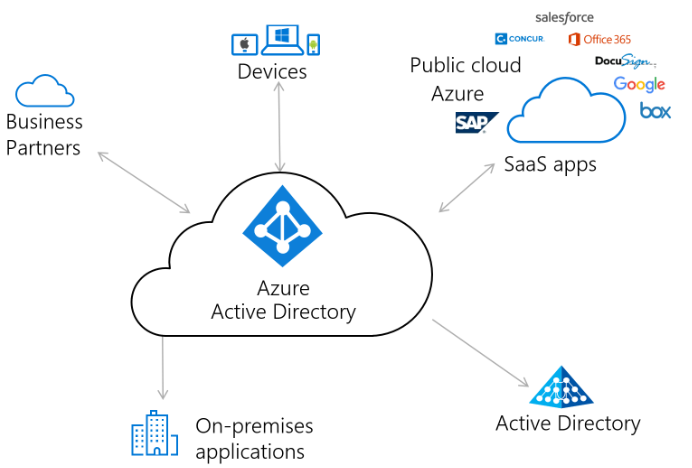
Every IT environment moves through the same lifecycle: you design it, you install and deploy it, you implement and integrate it into how the business runs, and then you maintain it for years. What's new is that AI, much of it delivered through Microsoft Azure, now shows up at every one of those stages. For a modern small business, that's not an abstract trend; it's the difference between an environment that quietly takes care of itself and one that constantly needs firefighting.
Here's how AI and Azure touch each phase, and why it matters even if you're a ten-person company.
1. Design
Good design is still where most problems are prevented or created. The fundamentals haven't changed: identity, networking, security, backup, and capacity all need to be thought through before anything is built. What AI adds is speed and a second set of eyes. Microsoft Copilot in Azure can answer architecture questions in plain language, explain services, and help reason about trade-offs, while frameworks like the Azure Well-Architected Framework keep designs aligned to reliability, security, and cost.
For a small business, design usually centers on identity and access. Microsoft Entra ID (formerly Azure Active Directory) becomes the front door to everything, Microsoft 365, apps, and devices, so designing it correctly, with the right groups, roles, and conditional access, is the highest-leverage decision you'll make.
2. Installation and deployment
Installation used to mean clicking through wizards and hoping you'd remember the steps next time. Modern practice is to define infrastructure as code, using tools like Bicep or Terraform, so an environment can be deployed the same way every time, reviewed, and rebuilt if needed. AI assistants now help write and explain that code, catch mistakes, and translate intent into configuration, which dramatically lowers the error rate.
The practical payoff for a small business is repeatability and documentation. When deployment is scripted, "how was this set up?" has an answer, and recovering or expanding the environment isn't a guessing game.
AI doesn't replace the engineer. It removes the slow, error-prone parts so the engineer can focus on the decisions that matter.
3. Implementation and integration
This is where the environment meets the business: migrating data, connecting applications, setting up backup and recovery, and locking in security. Azure provides the building blocks, Azure Backup for protected, tested recovery, Microsoft Defender for threat protection, and Microsoft Sentinel as a cloud security monitor that uses machine learning to spot suspicious patterns a human would miss in a flood of logs.
AI matters most here in security. The volume of signals in even a small environment is more than anyone can watch manually. AI-driven detection triages that noise, flags genuine risks, and increasingly drafts the response steps, so a small team gets enterprise-grade protection without an enterprise-sized security department.
4. Maintenance
Most of an IT environment's life is maintenance, and this is where AI quietly changes the day-to-day the most. Azure Monitor watches health and performance and can surface anomalies automatically. Azure Update Manager keeps systems patched on a schedule instead of "whenever someone remembers." Cost tools and Advisor recommendations flag waste before it shows up on the bill. And security copilots help investigate incidents faster by summarizing what happened and suggesting next steps.
The result is a shift from reactive to proactive. Instead of waiting for something to break and then scrambling, a well-instrumented Azure environment tells you what needs attention, often before users notice anything.
What this means for a small business
You don't need to "move everything to the cloud" to benefit from this. Most small businesses get the biggest wins from a focused set of Azure capabilities, identity with Entra ID, backup, security monitoring, and selective workloads, all of which now come with AI assistance built in. The point isn't to chase technology; it's that the modern toolset lets a small team run an environment that used to require a much larger one.
The risk is adopting these pieces ad hoc, without a coherent design or documentation, which is how small businesses end up with a fragile, half-configured cloud nobody fully understands. Handled deliberately, across design, deployment, implementation, and maintenance, AI and Azure make your operation more resilient, more secure, and far less dependent on any single person's memory.
That lifecycle, done right and documented, is exactly what we deliver.